Introducing a New Feature
Now you can listen to
WATV content.
Text-to-Speech (TTS) Feature Added
We’ve added a new TTS feature so you can conveniently enjoy WATV content anytime, even when it’s difficult to look at the screen.
Convenient While Doing Chores
Safe While Driving
Free While Working Out
How to Use
You can use this feature on content that displays the “Listen” button.
 Listen
6:10
Listen
6:10

01. Start Listening
Click the “Listen” button to bring up the player at the bottom of the screen and begin audio playback.
02. Expand Player
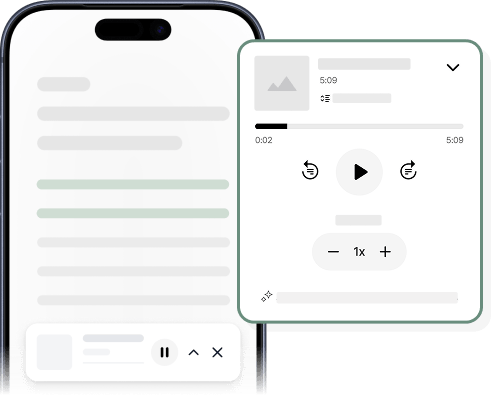
Expand the player to access more features. The section currently being read will be highlighted so you can easily follow along and check your current position.
Additional Features
Enjoy an even more convenient experience with these helpful features.
Auto-Scroll
The screen automatically scrolls along with the audio playback. You can turn this feature on or off as needed.

Sentence Navigation
Use the buttons to move to the previous or next sentence.

Playback Speed Control
Adjust the playback speed to your preference for a more comfortable listening experience.

-

AI-generated audio may contain slight differences in pronunciation or expression.
-

Support for Mongolian will be added in the future.
-

This feature may not function properly on older browsers.